
Hooks
Control request and response lifecycle with Thunder's powerful pre and post hook system.
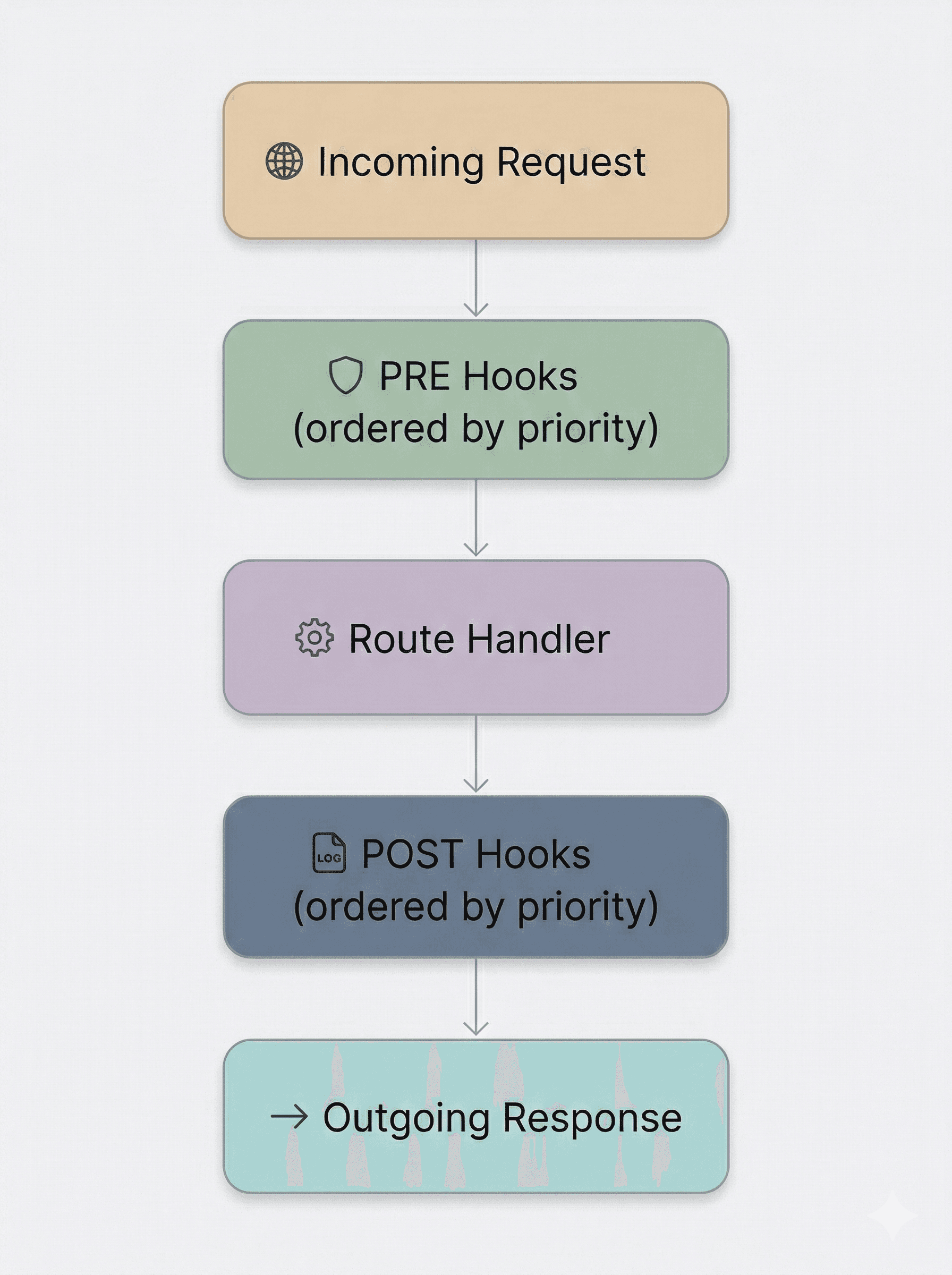
Lifecycle Overview
Hooks are one of Thunder's most powerful features. They give you precise, declarative control over the request/response lifecycle - without tangling middleware logic into your business code.
Hooks live in the hooks/ directory. Each file exports a single hook as a default export typed with THook. Every hook is composed of three concerns:
- Priority - determines the execution order relative to other hooks.
preblock - runs before the route handler executes.postblock - runs after the route handler produces a response.
Hook Priority
Priority controls the order in which hooks execute relative to one another. Thunder supports any numeric priority value, and higher numbers run first.
| Priority Value | Execution Order | Use Case |
|---|---|---|
100 | First - runs before every other hook | Security / authentication checks |
3, 2 ... | Descending - higher numbers run earlier | Validation, rate limiting |
1 | Last - runs after all other hooks | Logging, cleanup |
Use a high number like 100 for hooks that must always run first, such as
security or authentication checks. Use a low number like 1 (or even a
negative value such as -100) for cleanup or final logging hooks that should
run after everything else.
Hook Structure
A hook is a default-exported object satisfying the THook type. Both pre and post receive a context object containing the request, the router scope, and the handler name:
import type { THook } from "@/core/http/hooks.ts";
import { Response } from "@/core/http/response.ts";

export default {
  priority: 100, // Higher = runs first (optional)

  pre: async ({ req, scope, name }) => {
    // Runs BEFORE the handler.
    // `scope` = router name, `name` = handler name.
    const token = req.headers.get("Authorization");

    if (!token) {
      // Return a Response to short-circuit the request.
      return Response.unauthorized();
    }

    // Return void to continue to the handler.
  },

  post: async ({ req, res, scope, name }) => {
    // Runs AFTER the handler.
    // Return a Response to override, or void to keep the original.
  },
} satisfies THook;
The scope is the router's name and name is the handler's name - useful for
scoping behaviour to specific routers or handlers.
Pre Hooks
A pre hook executes before the route handler is invoked. This is the ideal place for:
- Authentication and authorization checks
- Request validation
- Header injection or modification
- Rate limiting enforcement
import type { THook } from "@/core/http/hooks.ts";
import { Response } from "@/core/http/response.ts";

export default {
  priority: 100,
  pre: async ({ req }) => {
    const token = req.headers.get("Authorization")?.replace("Bearer ", "");
    if (!token) return Response.unauthorized();

    try {
      const user = await verifyToken(token);

      // Store the user on the request headers so handlers can read it.
      req.headers.set("X-User-Id", user.id);
    } catch {
      return Response.unauthorized();
    }
  },
} satisfies THook;
If a pre hook returns a Response, the route handler is skipped entirely
and that response is sent straight to the client - making hooks an elegant
mechanism for short-circuiting invalid requests.
Post Hooks
A post hook executes after the route handler has returned a response. This is the ideal place for:
- Request/response logging
- Analytics and telemetry
- Executing side effects (e.g. invalidating cache)
import type { THook } from "@/core/http/hooks.ts";
import { Logger } from "@/core/utils/logger.ts";

export default {
  priority: -100, // Lower number = runs last (after all other hooks)
  post: async ({ req, res, name }) => {
    Logger.info(`[${req.method}] ${req.url} → ${res.status} (${name})`);
  },
} satisfies THook;
Using Both Pre and Post
A single hook definition can include both a pre and a post block. Pass data between them by attaching it to the request headers:
import type { THook } from "@/core/http/hooks.ts";
import { Logger } from "@/core/utils/logger.ts";

export default {
  priority: 2,
  pre: async ({ req }) => {
    req.headers.set("X-Start-Time", Date.now().toString());
  },
  post: async ({ req }) => {
    const start = Number(req.headers.get("X-Start-Time"));
    Logger.info(`Request completed in ${Date.now() - start}ms`);
  },
} satisfies THook;
Priority Examples
// priority 100 - runs before everything else
export default {
  priority: 100,
  pre: async ({ req }) => {
    // Block suspicious requests
  },
} satisfies THook;
// Higher priority runs first: hookA (priority 3) runs before hookB (priority 2)
export default { priority: 3, pre: async ({ req }) => { /* ... */ } } satisfies THook;
export default { priority: 2, pre: async ({ req }) => { /* ... */ } } satisfies THook;// priority -100 - runs after all other hooks complete
export default {
priority: -100,
post: async ({ req, res }) => {
// Final cleanup or audit logging
},
} satisfies THook;Plugins follow the same priority convention: 100+ for auth/security,
50-99 for business logic, 0-49 for optional hooks, and -100 for
logging/cleanup. See the Plugins page for details.